 CiNotes
What can go on a calculator cheat sheet?
How to make one
- Put the material in a PDF, or copy the text you want.
- Upload the PDF to CiNotes, or paste the text into notes on the order form.
- Use clear section titles. If there are answers, keep them in the same PDF as the questions.
- Get the calculator files by email.
- Unzip the download, send every file inside it with TI Connect CE, then browse or search on the calculator.
Why search beats scrolling
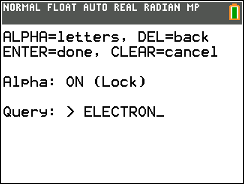
Most calculator notes programs make you page through text until you spot what you need. CiNotes builds a small search index alongside your notes. Type part of a word, open a result, and land on the highlighted line.
.png)
Yes, it survives a RAM clear.
You were going to ask. Everything lives in Archive memory, which a RAM clear skips. Your formulas are still there afterward.
Cheat-sheet questions
Can I make a short one for free?
Yes. Up to 300 pasted words in total costs nothing. Longer text and PDFs have one-time prices you see before paying.
Can it include an answer key?
Yes. Keep the answer key or rubric in the same PDF as the questions, and each answer stays with its question.
Does it work in Press-to-Test mode?
No. Press-to-Test exists to switch off programs and stored files, and it does exactly that. CiNotes works whenever calculator programs are allowed. Whoever runs the test sets the rules.
Your “quick reference” can be as long as you want.
We don’t judge the page count. We just price it.
Make my cheat sheet