 CiNotes
What CiNotes actually is.
A way to carry your notes on the calculator you already bring to class. You give us a PDF or some text. We give you a program for your TI-84 Plus CE that lets you read it, flip through it, and search it.
- Upload or pasteA PDF, some text, or both
- We turn it into notesSized for a 26-character screen
- You get an emailUsually within minutes
- Send it by USBWith the free TI Connect CE app
What it looks like on the calculator
These are real screenshots from a TI-84 Plus CE. Open CiNotes to browse everything or search for a word. The word you searched for is highlighted, you can hop from one result to the next, and it remembers where you stopped.
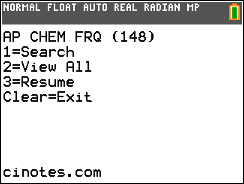
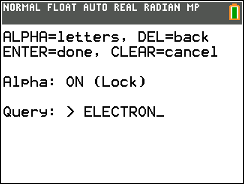
.png)
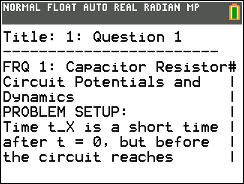
Want to try the controls yourself? The calculator on the home page is a working demo.
What goes in, and what you get
PDFs
Study guides, review packets, formula sheets, question banks, worked examples. Typed PDFs and clean scans work best. Handwriting and phone photos are hit or miss.
Pasted text
Paste notes straight into the page. Up to 300 words is free, which is a good way to try it before you buy anything.
Search across everything
One search looks through every note at once, highlights the word, and lets you step from one result to the next.
RAM clears
CiNotes keeps its files in Archive memory, so a RAM clear leaves your notes and your saved place alone.
What about the Calculator ID?
Each order comes with setup for one calculator. If you already know that calculator’s ID, type it in when you order and the download arrives ready to go.
If you don’t know it, leave it blank. Put the files on your calculator and open CiNotes once. It shows you the ID right there on the screen, and you finish the setup for free at cinotes.com/setup. Want the same notes on a second calculator? That’s a small add-on, and nobody has to upload anything again.
What you need
- A TI-84 Plus CE or TI-84 Plus CE Python Edition. It doesn’t run on the black-and-white TI-84 Plus, the TI-83, or the TI-84 Plus C Silver Edition.
- A computer, the calculator’s USB cable, and the free TI Connect CE app from Texas Instruments.
- A PDF or some text you want on the calculator.
One thing to check first
If your calculator is on OS 5.4 or lower, it works as-is. On OS 5.5 or newer, there’s a free two-minute setup with a tool called arTIfiCE before CiNotes can open. Check your version in fifteen seconds.
What it costs
A PDF costs $3 for the first 10 pages, then 10¢ a page up to page 50 and 5¢ a page after that. Short pasted notes are free. You pay once per order. There’s no subscription and nothing renews. See the full pricing.
Want your own?
Upload a PDF or paste some notes. You’ll see the price before you pay anything.
Make my calculator notes