 CiNotes
Your three options
| Option | How it goes | Best for |
|---|---|---|
| TI-BASIC editor | Paste text into a program editor, then send the program over | Very short text you don’t mind formatting by hand |
| Notes CE converter | Save a TXT file, run ConvText, send the viewer and the data | People comfortable managing files themselves |
| CiNotes pasted text | Paste in your browser, get back a searchable viewer with your notes | Quick setup and built-in search |
Pasting text into CiNotes
- Open the CiNotes order form.
- Press + Paste your own notes.
- Give the note a title and paste your text. A preview shows roughly how it’ll look on the calculator.
- Add more notes if you want separate sections. Each title shows up in the list on the calculator.
- Enter your email and continue. You’ll see the exact price before you pay.
- Unzip the download and send every file inside it to the calculator with TI Connect CE.
Short notes really are free
Up to 300 pasted words in total costs $0, which makes it the easiest way to try CiNotes before converting a longer PDF.
Why can’t I paste straight into TI Connect CE?
The calculator doesn’t understand clipboard text, Word files, Google Docs, or PDFs. Text has to be encoded into a TI program or data file, and something on the calculator has to know how to show it.
That’s the gap tools like Notes CE and CiNotes fill. CiNotes also makes the text searchable: type a word on the calculator and it jumps to each place you wrote it.
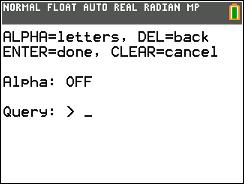
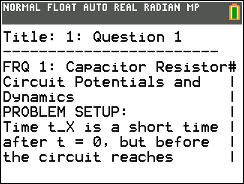
No re-pasting after a RAM clear.
Your notes live in Archive memory, so a RAM clear leaves them alone. Clear it as often as you like; your notes, the search index, and your saved place are still there afterward.
Copy-and-paste questions
Can I paste from Google Docs or Word?
Yes. Copy the text from either and paste it into a CiNotes note. For a long document with lots of formatting, exporting it as a PDF usually keeps the structure better.
What happens to symbols like ² or ≤?
They’re converted into things the calculator can show, like ^2 and <=. Before you pay, the review screen shows every conversion side by side with your original.
Can I edit the notes on the calculator?
No. CiNotes is built for reading and searching. Edit on your computer instead. Your delivery includes an editable copy you can use to request updated files.
Does it work on Mac and Windows?
Yes. The website works in any browser, and TI Connect CE runs on both macOS and Windows.